Troubleshooting connection issues with an on-premises Exchange server
Modified on Fri, 2 Oct at 4:21 PM
Who this article is for
This article applies to a classic (on-premises) Exchange server that uses a user name and password.
It does not apply to Microsoft 365 or to Exchange hybrid setups with modern authentication. For those, see Microsoft 365 connection stopped working.
Step 1: Check the Exchange version
By default, Automatic Email Manager connects as Exchange 2015 or later. If your server runs Exchange 2013 or earlier:
- Edit the account and go to step 3.
- Click More options.
- Set Exchange server version to Exchange 2010.
- Click Test connection.
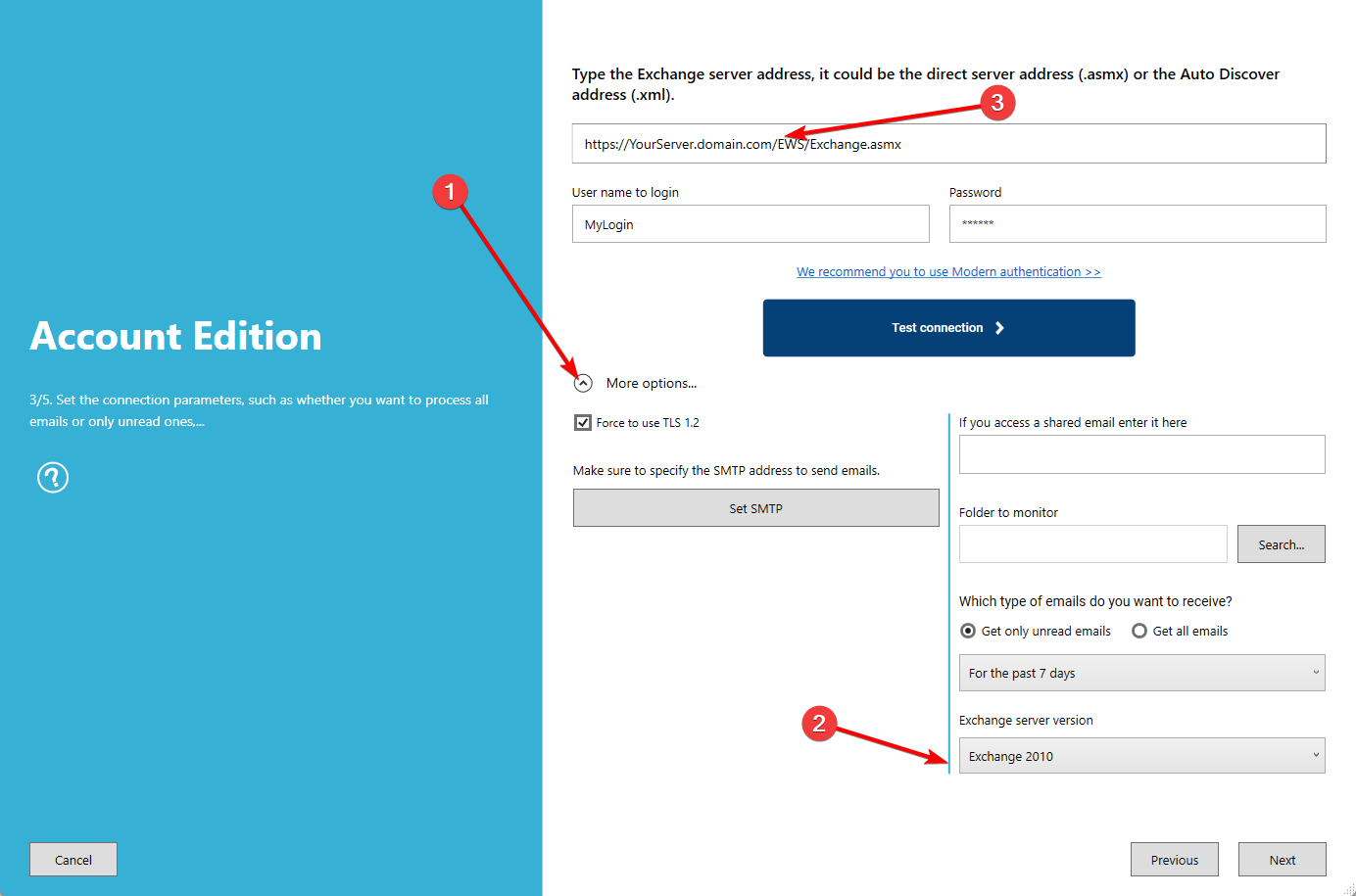
If the test still fails, go to step 2.
Step 2: Check the EWS address
The Exchange Web Services (EWS) address must look like this:
https://YourExchangeServer.YourDomain.com/EWS/Exchange.asmx
To find the right address, use one of these methods.
Method 1: Exchange Management Shell
- Open the Exchange Management Shell on your Exchange server.
- Run this command:
Get-WebServicesVirtualDirectory | Select-Object Name,Server,InternalUrl,ExternalUrl- Use the ExternalUrl shown in the result.
Method 2: Exchange Admin Center (EAC)
- Open
https://<ExchangeServerName>/ecpin your browser and sign in as an administrator. - Go to Servers > Virtual directories.
- Select the EWS virtual directory.
- In the details pane, copy the External URL.
Paste the address in your account settings, then click Test connection.
Tip: If Automatic Email Manager runs inside your network, the Internal URL may work better than the External URL. Try both.
Step 3: Contact support
If the problem persists, contact us and include:
- Your Exchange version
- The EWS address you used
- The error message shown after Test connection
Was this article helpful?
That’s Great!
Thank you for your feedback
Sorry! We couldn't be helpful
Thank you for your feedback
Feedback sent
We appreciate your effort and will try to fix the article