Action: Add email address to a list
Modified on Tue, 29 Sep at 4:18 PM
Automatically collect the email addresses of incoming messages. You can use them in your scenario conditions (for example, to block or allow specific senders), or export them to a text file for Excel or a CRM such as SAP, HubSpot, Salesforce, or Dynamics.
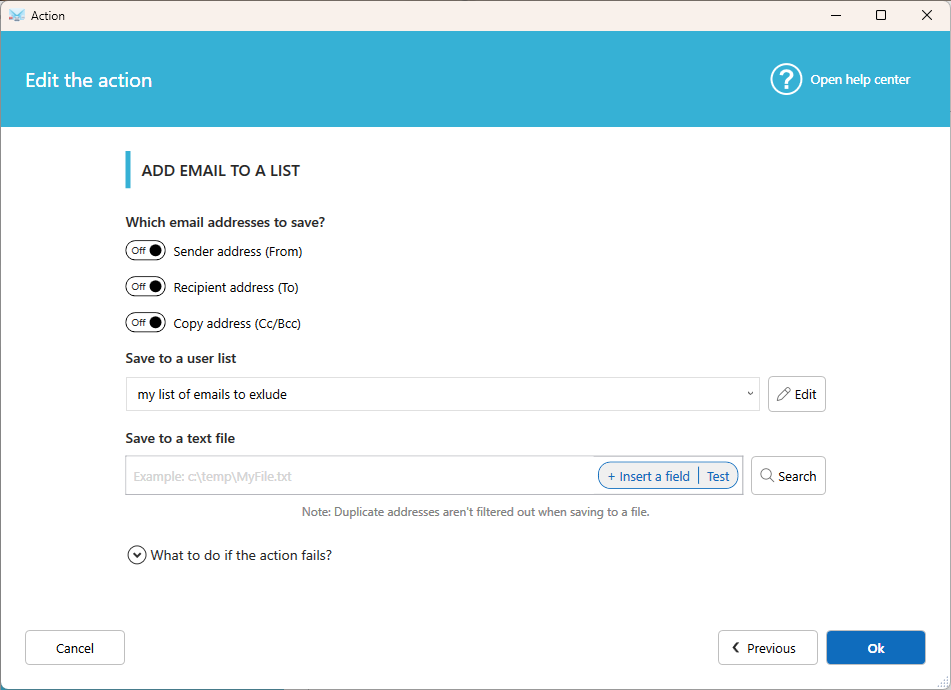
Settings:
Which email addresses to save
Choose one or more:
- Sender (From): the most common choice.
- Recipient (To)
- Copy (Cc/Bcc)
You can select all three at the same time.
Save in a user list
Add addresses to a list that your scenario conditions can use, for example "process this email only if the sender is in this list."
- An address is added only if it isn't already in the list.
- Click Edit the lists to create or edit a list.
Save in a text file
Enter the folder and file name. Each address is added as a new line at the end of the file.
- Duplicates are not checked. If the same address arrives twice, it is saved twice.
If the action fails
This action supports Fail Action, which lets you run another action, continue, or stop when something goes wrong. Learn more about Fail Action.
Was this article helpful?
That’s Great!
Thank you for your feedback
Sorry! We couldn't be helpful
Thank you for your feedback
Feedback sent
We appreciate your effort and will try to fix the article