Action: Send an HTTP request to any webserver or api
Modified on Tue, 29 Sep at 4:17 PM
Call a web page or API each time an email arrives. Use it to trigger a workflow, send an alert, or push email data to another system.
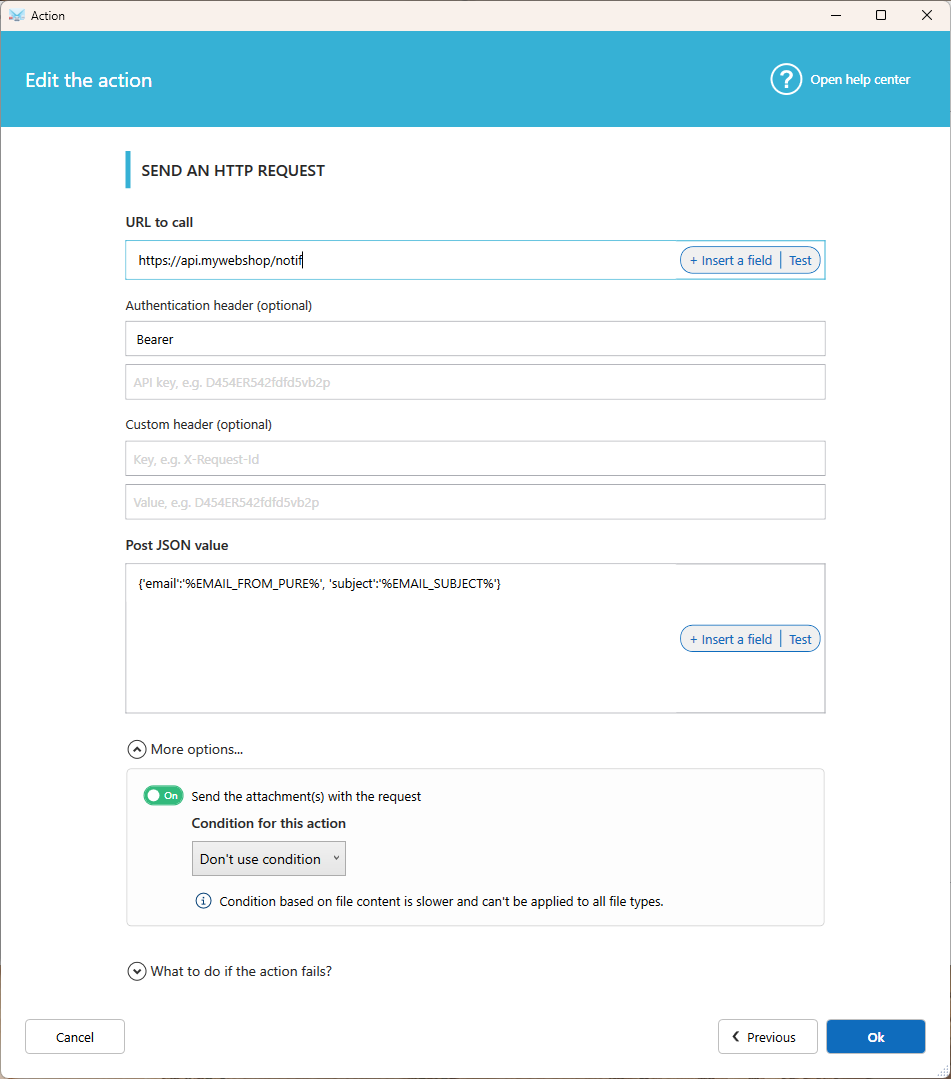
Settings
URL to call
Enter the web address to call. Click Insert a field to add email data to the URL, such as the subject or sender address.
Authentication header (optional)
Enter the authentication type (for example Bearer) and your API key.
Custom header (optional)
Add one extra header, with its key (for example X-Request-Id) and its value.
Post JSON value
Enter the JSON data to send with the request. Click Insert a field to add email data such as the subject, sender, recipients, or attachment names.
Example:
{"email": "%EMAIL_FROM_PURE%", "subject": "%EMAIL_SUBJECT%"}More options
Send the attachment(s) with the request
Turn this on to send the email's attachments together with the request.
Condition for this action
Send only the attachments you need. Choose a condition on the attachment file name (for example, only .pdf files) or on its content.
- Conditions on file content are slower and don't work with every file type.
What to do if the action fails?
Choose to continue, stop, or run another action. Learn more about Fail Action.
Was this article helpful?
That’s Great!
Thank you for your feedback
Sorry! We couldn't be helpful
Thank you for your feedback
Feedback sent
We appreciate your effort and will try to fix the article