Action: Preprocess email content with AI
Modified on Fri, 2 Oct at 11:11 AM
Let AI read your emails for you. Summarize a long message, translate it, or get its sentiment, then use the result in other actions, like printing, saving, or notifications. You can even turn the result into audio.
Available since version 10. This action is completely optional. You choose your AI provider (OpenAI ChatGPT or Google Gemini) and use your own API key, so you stay in control of your data.
Privacy: When you use this action, the email data is sent to the AI service you selected. The result comes back as text. Don't use this action for emails that must not leave your network.
Add the action
- Create or edit a scenario.
- Click Add action, then select Preprocess with AI, then Preprocess email content.
- Choose your model, enter your prompt, and click Ok.
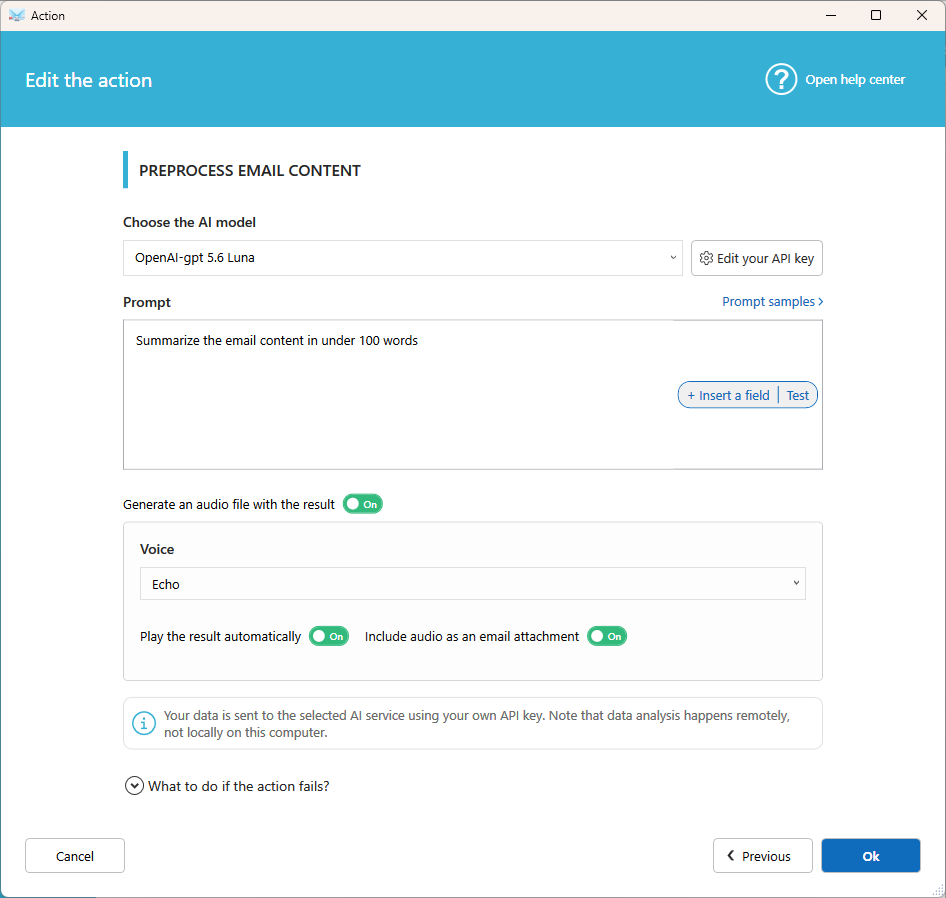
Settings
AI model
Select the model to use. The list is updated regularly with the latest models.
API key
Enter your own API key for ChatGPT or Gemini. Set a default key in Options, so you don't have to enter it in every action. Learn how to get your API key.
Prompt
Write the instruction you give to the AI, for example Summarize this email in 3 bullet points. Click Insert a field to add email data, such as the subject. Prompt samples are provided to help you start.
Generate an audio file with the result
Turn this on to get the result as an MP3 audio file.
Voice
Choose a voice among those offered by your AI model.
Play the result automatically
Play the audio as soon as it's ready. You can control the player from the Dashboard. Useful to hear important emails without reading them, and a great help for visually impaired users.
Include audio as an email attachment
Save the audio in the email's attachments folder. It is then processed like a regular attachment, for example saved to disk or sent by email.
Use the result in other actions
The AI result is available in the next actions of your scenario, such as Print email body, Send an email, or Send a message to a Slack channel, ..., turn on Use AI content analysis to use it.

Or with the %EMAIL_BODY_AI_RESULT% field that you can use in your template.
Prompt examples
- Summarize this email in 3 bullet points.
- Translate this email into French.
- Is the tone of this email positive, neutral, or negative? Answer with one word.
- Extract the order number and the delivery date.
Related articles
- Action: Preprocess attachments with AI
- What is a scenario?
- Action: Send a message to Teams
Was this article helpful?
That’s Great!
Thank you for your feedback
Sorry! We couldn't be helpful
Thank you for your feedback
Feedback sent
We appreciate your effort and will try to fix the article