Action: Print email body
Modified on Thu, 1 Oct at 6:54 PM
Print every email automatically as soon as it arrives. No need to open it, choose a printer, and click print. Everything is done for you, and you save time every day.
Add the action
- Create or edit a scenario.
- Click Add action, then select Printing, then Print email body.
- Select the printer.
- Click Ok to save the action.
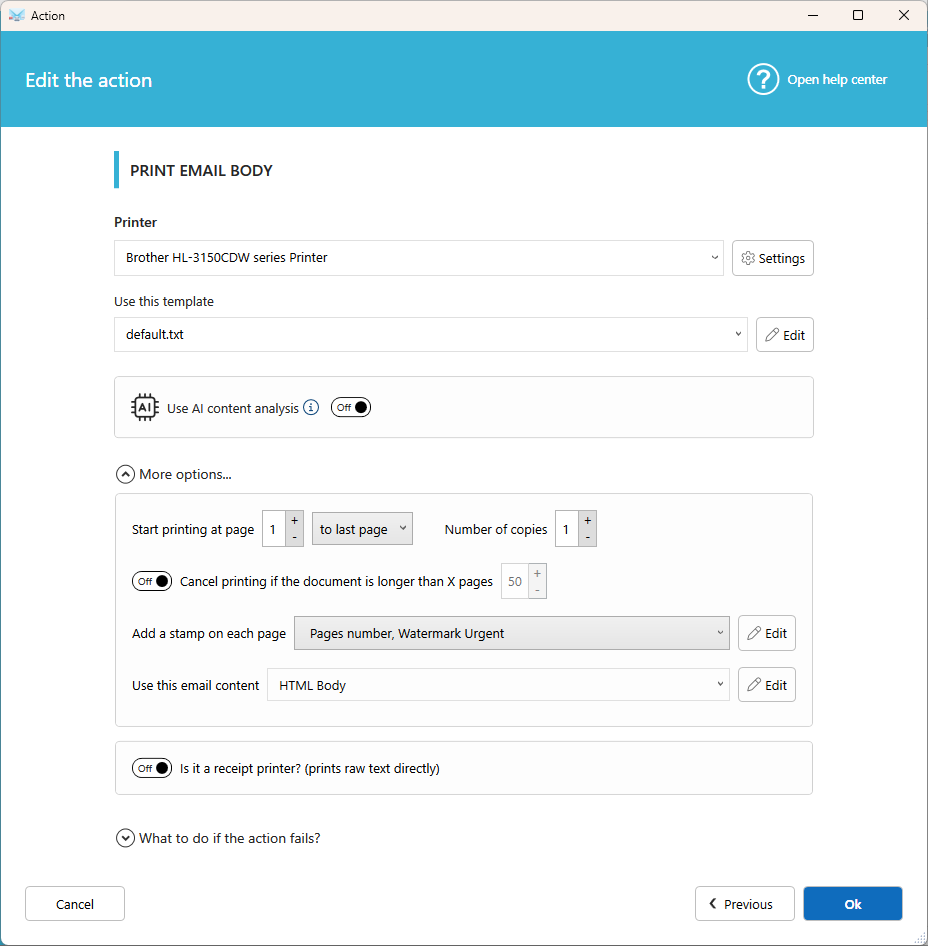
Settings
On this printer
Select one of your installed printers, or use the default printer. Click Settings to adjust margins, paper tray, duplex mode, and more.
Use this template
Choose the template used to print the email. You can select some default models or create your own by clicking on 'Edit'.
Use AI content analysis
Let AI process the email content and make the result available in the %EMAIL_BODY% field. Learn more.
Print range
Choose the first page to print and the number of copies.
Cancel printing if the document is longer than x pages
Avoid printing very long emails by mistake. If the email exceeds the number of pages you set, nothing is printed.
Add a stamp
Add a stamp or page numbers on each page, for example Received on with the date. Create your stamps in Tools, then Stamp templates.
Use this email content
By default, the full HTML content of the email is used. Select another source, or a data extractor template, to print only a specific part of the email (see Extract data from an email).
Receipt printer
Printing on a receipt printer? Select the plain text version of the email, or the TEXT from HTML conversion data, for a clean and compact result.
Tips
- To print the attachments too, add Print attachment(s) to the same scenario.
- To print only certain emails, such as orders, add a condition to the scenario.
- If the text prints very small, turn off Enable the HTML tag PRE in Options, then Advanced options.
Related articles
- Action: Print attachment(s)
- Add a stamp, watermark, or QR code
Was this article helpful?
That’s Great!
Thank you for your feedback
Sorry! We couldn't be helpful
Thank you for your feedback
Feedback sent
We appreciate your effort and will try to fix the article